Monday, October 7, 2013
Monday, September 30, 2013
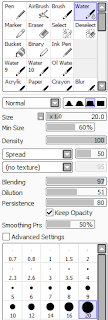
Watercolor - Layer Properties
Assignment:
Please find a reference image of something non-geometrical that you would like to copy; something fairly simple, like a natural object. Some ideas:
- Smoke Cloud
- Cloud
- Ink Drop in Water
- Hair
- Tree
- Rock
- Begin to make a sketch of your reference image.
- Make a master color layer that we can clip the shadows and lights onto, as separate layers.
- Begin making the shadows as a layer set to multiply
- Begin making the lights as a layer set to overlay, screen, or luminosity.
- Post your progress in your bog (WIP).
Day 2:
- Use Layer Texture (Watercolor) and Layer Effect (Fringe) to make your painting look more like a watercolor image.
- Use the blur or watercolor tool where you like to alter the look of the painting.
Tuesday, September 17, 2013
Using Clipping or Masking - Concept Art
Now that you have a little bit of a experience with masking, let's put together a project that makes use of masking. Choose or make a character to draw, and we'll make full picture of it, using color & shading with clipping.
Assignment:
- First, choose a subject for your drawing.
- Please spend some time setting up the initial layers of a drawing you'd like to color. You'll need to make an initial sketch of what you want to draw, then make a new layer with clean line art.
- Check with me when you've finished this step. I want you to have really clean line art.
- If you need a review on how to make clean line art, I'll go over that with you, or you can watch: Lineart Tutorial
- Once you're ready to color, begin separating your main colors onto different layers
- You may follow along with this tutorial, if you like: Ocean's Paint Tool SAI Tutorial: Skin
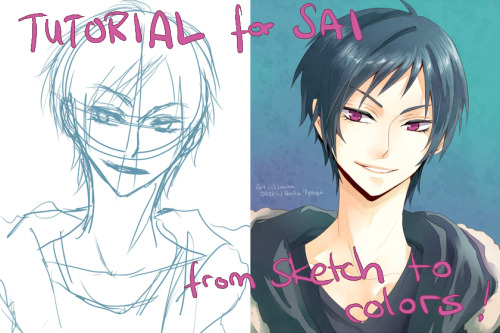
- Here's an advanced tutorial you can read, on tumblr: From Sketch to Colors
Clipping Layers & Masking
Because masking and clipping allow us to draw and paint within a limited space, they can be extremely useful techniques to know! If you are following the traditional drawing technique of using: sketch, lines, color, clipping and masking will streamline your process significantly.
Here is a video that shows an example of using clipping layers:
Here's another video that shows how to use masking:
Assignment:
- Please further explore clipping and masking. It is important that you at least understand how to use both.
- Once you have posted your picture on Deviantart, and I have seen your .SAI file, you are finished for the day!
- For your next assignment, I'm going to ask you to have clean lineart. If you need a review on how to make clean line art, I'll go over that with you, or you can watch: Lineart Tutorial
Wednesday, September 11, 2013
Special Problems in Human Anatomy: The Neck
Now that we have finished a little bit of practice with gestures, let's zoom in a bit.
Let's start taking a look at some 'trouble' spots of the anatomy -- areas that regularly give artists trouble. You may know some of thee already: the hands, the feet, the head and neck, etc.
Today, let's take a break from the body as a whole and just focus specifically on the way the head attaches to the body through the neck, and spine. A lot of times,
Let's start taking a look at some 'trouble' spots of the anatomy -- areas that regularly give artists trouble. You may know some of thee already: the hands, the feet, the head and neck, etc.
Today, let's take a break from the body as a whole and just focus specifically on the way the head attaches to the body through the neck, and spine. A lot of times,
Assignment:
- Please watch some of these recommended videos:
- How to Draw the Neck (looking at skeletal anatomy)
- How to Draw Necks (looking at muscle anatomy)
- Drawing the Back to Neck Rythm (looking at gestural forces)
- Please make 3 sketches of this head/neck area (from stock reference or from imagination).
- Post your drawings.
Sunday, September 8, 2013
Using Reference - Human Figure
It might sounds silly, but a very important skill for artists is being able to copy! Copying not only helps us be accurate, but allows us to start to build a mental image of whatever we reference, so we can draw from imagination.
Please watch the explanation and examples of what a 'gesture' is. You may draw as you watch. The video sis about 20 minutes long, but most of it is realtime examples:
http://www.youtube.com/watch?v=xmiwGm32dXU&list=PLC1sAfc6uw7oM7D-EYffRPFui1U9BOlom&index=16
Your assignment:
- Draw 5 gesture drawings and post them. Please limit your gestures to 5 minutes each. You may post them a single file or separately. You do not need to email these to me.
- Here is a handy set of human figure stock photography that you can use as references: http://seadrinker.tumblr.com/post/60721104134/shinga-tumblr-fujo-senshistocks-gallery
Tuesday, September 3, 2013
Intro to Digital Art
Hi, guys! Ok, as we get this class under way, let me update you on a few details:
- I'm going to have some video tutorials set up that you can watch at home, if you like. You may find them here
- As we wait for out school tablets, I will compile a list of drivers for your personal tablets, so you don't have to hunt them down every day. You will need to re-install them each period, unfortunately, until our school tablets arrive. This list will be located here:
- Lastly, here are some pictures if you can't think of something to reference
- The Small Majority (bugs and other animals)
- Anatomical Art Tumblr (humans and whatnot)
- Animal Drawing Practice Tool (other animals)
- Pinterest Animal References
- Pokemon Fusion
- Habitats (landscapes)
Subscribe to:
Posts (Atom)